 organarium
Docs
Organarium is a task and project manager your AI agents can read and write through a remote MCP server. Connect it once and your agent can work on your boards as you.
Agent doesn't use MCP? See the REST API docs.
Before you connect
You need an Organarium account with an active subscription or an invite. Sign up first, then use this server URL:
https://mcp.organarium.com/mcpConnect your agent
Claude app
- On Organarium's page in Claude, select Connect to Claude.
- Log in to Organarium.
- Open Organarium in your connectors. Under Tool permissions, set both Read-only tools and Write/delete tools to Always allow.
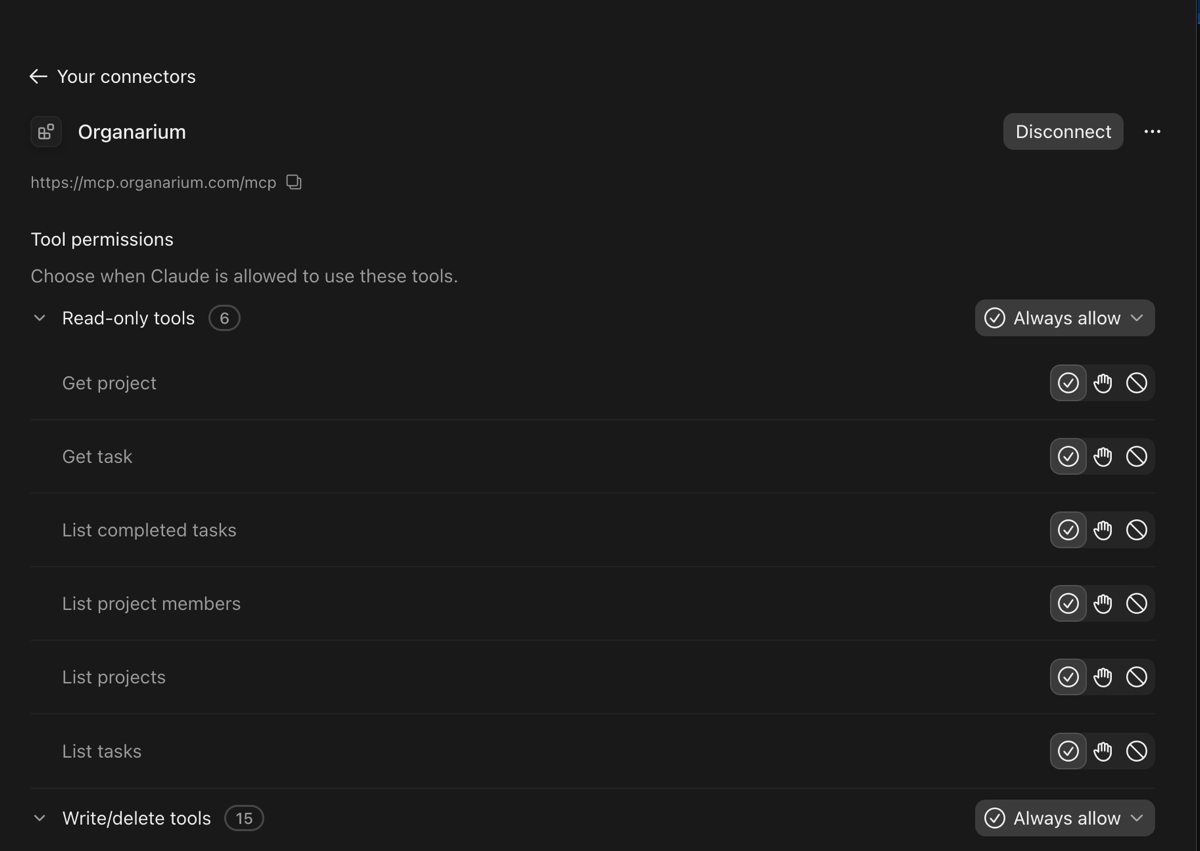
We recommend Always allow so Claude can use Organarium without stopping to ask each time. This includes creating, changing and deleting tasks, so pick another option if you'd rather approve those yourself.
On Team and Enterprise plans, an Owner adds the connector for the organization, then each member connects with their own account. If it isn't enabled yet, members can request it.
Add it with the server URL instead
- Open Customize > Connectors, click + Add at the top right and choose Add custom connector.

- Paste the server URL. If asked for an OAuth client, choose Register automatically.
- Click Add, then connect and log in to Organarium.
Free plans allow one custom connector.
Claude Code
If you've already connected Organarium in Claude and log in to Claude Code with the same account, it's already available. Check with /mcp. Otherwise, run this in your terminal:
claude mcp add --transport http --scope user organarium https://mcp.organarium.com/mcpThen open Claude Code, type /mcp, select organarium and log in.
Another MCP client
Point any client that supports remote MCP servers over Streamable HTTP and OAuth at the server URL. Steps vary by client, so check its documentation for where to add a remote server.
What to ask your agent
- List my Organarium projects.
- What's in progress on my website project?
- Create a high-priority task to fix the login bug and add it to Up next.
- Add an update to that task saying the fix is ready for review, then move it to Done.
Available tools
list_projects, get_project, list_project_members, list_tasks, list_done, get_taskcreate_project, update_project, add_project_link, create_invite, accept_invitecreate_task, update_task, assign_task, add_link, add_updateadd_todo, update_todo, toggle_todo, assign_tododelete_taskWithout MCP
Agents and scripts without an MCP client can use the REST API instead. It does everything the tools above do.
Access and permissions
Your agent logs in with your Organarium account through OAuth, so you don't need an API key. It can only reach projects you belong to, and every change it makes appears in the project's activity feed.
Troubleshooting
If your client reports a 403 error, your account doesn't have an active subscription or invite. Check its status on your dashboard. If it reports a 401 error, reconnect and log in again.
Disconnect
In the Claude app, remove the connector under Customize > Connectors. In Claude Code, run:
claude mcp remove organarium -s userHelp
Still stuck? Contact support. See also the privacy policy and terms.